Easy Calculator Pro1.3.7
Publisher Description
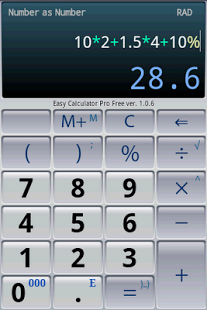
It is a simple but very powerful calculator for everyday use. You can use it just as a pocket calculator with percentage button and memory feature or you may turn it into a universal scientific tool. The live as-you-type expression view helps you never lose your place in a calculation.
Its very precise up to 40 digits, unlike a normal calculator that only provides 15 significant digits calculation.
Easy Calculator Pro supports date and time functions, may display result in various formats, can work with constants and mathematical functions.
Easy Calculator Pro allows you to keep all the history of your calculations, make notes, send by email or return values and expressions back to the calculator.
Features:
* Expression calculation.
* Calculation history.
* Advanced percent calculation (Discounts, Tax, Tips).
* Precision up to 40 significant decimal digits.
* Advanced result formatting. As: numbers, dates, percents, hex, oct, bin... representations.
* Can display result as fraction: 1.125 -> 9/8 or as 1+1/8
* Expression syntax highlight - easy reading.
* Exact error highlight - easy correction.
* Engineer and scientific functions.
* Date and time operations
* Radians and degrees with Degree-Minute-Second (DMS) feature
* Support angle measures in degree and decimal notation: d°m.m' and d°m'.m
* Saving state between sessions.
* Memory feature.
* Smart-button technology.
* Predefined constants.
* Vibration on touch.
* In-app purchase donate feature. If you like this program, you may help us to maintain and improve the EasyCalPro Free.
Examples
Percent feature allows you easy ways to calculate tips, tax or discounts:
7*2 + 1.5*4 + 10%
Using the constants you can easy find out the radius of the Earth:
√(G*Me/g)
date (12;05; 15) + 40*7 - get date offset (40 weeks)
40/tan(37°23') - easy way to find height of building with angle of elevation.
Or find out the poker probability of specific pocket pair:
C(4; 2)/C(50; 2)
KW: engineer scientific advanced calculator, EasyCalcPro, Tip Calculator, navigational calculations.
About Easy Calculator Pro
The company that develops Easy Calculator Pro is Andrei Kulik. The latest version released by its developer is 1.3.7. This app was rated by 2 users of our site and has an average rating of 4.3.
To install Easy Calculator Pro on your Android device, just click the green Continue To App button above to start the installation process. The app is listed on our website since 2013-12-12 and was downloaded 340 times. We have already checked if the download link is safe, however for your own protection we recommend that you scan the downloaded app with your antivirus. Your antivirus may detect the Easy Calculator Pro as malware as malware if the download link to com.msj.easycalcpro is broken.
How to install Easy Calculator Pro on your Android device:
- Click on the Continue To App button on our website. This will redirect you to Google Play.
- Once the Easy Calculator Pro is shown in the Google Play listing of your Android device, you can start its download and installation. Tap on the Install button located below the search bar and to the right of the app icon.
- A pop-up window with the permissions required by Easy Calculator Pro will be shown. Click on Accept to continue the process.
- Easy Calculator Pro will be downloaded onto your device, displaying a progress. Once the download completes, the installation will start and you'll get a notification after the installation is finished.
Program Details
System requirements
Download information
Pricing
Version History
version 1.3.7
posted on 2013-12-12
bugs fixed:,* No three-points menu soft-button on KitKat,* Can't display result in decimal degrees in expressions like atan(40). Now angle is displayed according to the value of "deg/rad" switch.
version 1.3.4
posted on 2013-04-24
Several fixes and updates
